The Creative Process
13/10/15
After much deliberation, I have decided to record a mashup of video game theme songs, created entirely using game controllers as midi devices.
I began by researching what controllers could be connected to a mac quite easily. I remember once seeing someone use a wii remote as one, however had no luck in getting it to connect to the computer. So I dusted off my old PS3 controller, and found it connected very easily to the computer via bluetooth, but then I had to figure out how to map each button to a different midi note. I watched several youtube videos of people who had done this, but they had done it by mapping each button to a different keystroke and then just having the musical typing open in Logic. I took it one step further and found a program called ControllerMate which has a free version (limited) with the full version only costing $35, and it allows for PS3 controller buttons to be mapped to specific midi notes quite easily.
I then began to think about what pieces I wanted to include in my mashup, I wanted to make sure they were all games that I had grown up playing. My first choice was of course the super mario theme song, pretty much everyone would recognise it straight away. After much youtubing, and advice from nerdy friends, I decided the following needed to be included:
- Super Mario
- Crash Bandicoot
- Banjo Kazooie
- Zelda: Ocarina of Time
- Tetris
- Sonic the Hedgehog
I then began to map out Super Mario on the PS3 controller, check out below to see the map and the result.

14/10/15
Today I began thinking about the arrangment of the piece, I begin with Super Mario as it is probably the most well known theme song I'm using. I then put in Crash Bandicoot, and then Tetris; luckily both are already in C major, and then A minor (yay for video game composers making my life easy). I thought it would be easiest to notate the arrangement to be able to plan it carefully. You can view the beginning of my arrangement below (I use MuseScore for all notation).

I then began mapping out on the PS3 controller the melodies, I have to map out each piece separetly because of a lack of buttons available. Check out the videos of me playing my mapped out midi for each piece.
Below, Crash Bandicoot is on the left and Tetris is on the right.
15/10/15
Today is THE most amazing day ever. I managed to get my wii plus remote (which happens to be yoshi themed, which is amazing) to work with midi and motion control.
I found this free program called OSCulator which lets you map out each wii remote button, and also map the motion of it. Check out the movement of the wii remote plus below.
I had some old guitar hero and DJ hero controllers sitting around, but unforunately could not find the USB receivers anywhere. Then, just as I had almost given up all hope, I found them in a random box in a random cupboard, that had some other amazing items such as one of those digital polly parrots (amazing).
So then, I was able to use ControllerMate to map out the bottons on each. I thought the DJ deck would be great for a drum track, and the guitar will probably be used for the bass line in the mashup. Check out videos of both below.
I've got some old school NES controllers in the mail on their way, hopefully they will be relatively easy to map out with midi.
So here are the controllers I'm going to use:
- PS3 (Melody)
- 2 wii u remote plus controllers (yoshi and peach) [yay] (melody 2)
- DJ Hero (drums)
- Guitar Hero (bass)
- NES controller (harmonies)
Now that I have all the software working my next task is to finish my arrangement.
16/10/15
Today I continued my arrangement, I found a great website Game Sheet Music that has arrangements of famous game themes available.
I used some ideas from some of the sheet music on this website, now my piece includes the following themes (click on the links to see the original sheet music):
- Super Mario "Overworld Theme"
- Crash Bandicoot 1 Theme (from MuseScore)
- Sonic The Hedgehog "Greenhill Zone"
- The Legend of Zelda: Ocarina of Time "Lost Woods"
I was originally going to include something from Banjo Kazooie, but ended up deciding against it.
You can view my arrangement here (at this stage it is a draft as I will probably have to make changes)

I wanted to find a good sound that I could use for video game synths in Logic. I found this great YouTube video that explains which synthesiser works well for video games.
I ended up using the ESP Polyphonic Synth that is really quite a basic synth, but back when a lot of these games were made, it was the kind of sound that was used.
Then to get the really old 8bit sound, I used the BitCrusher distortion effect.
Now I am continuing to map out each of the individual themes on a controller so they can be played.
Check out below the 8bit sounding Sonic theme.
18/10/15
Today I worked on mapping out the midi on the controllers for the rest of the theme songs.
So every theme has a different map, but then every part within every theme (eg. harmony, bass) have a different map as well, and because I am using the wii controllers as well as ps3, I'm using OSCulator and ControllerMate.
As I'm mapping them out, I'm doing rough recordings using Logic just to ensure my harmonies and everything work well.
I still need to map out the Pokemon theme, I realised that I had put it into MuseScore in D Dorian mode rather than C, so I've had to transpose.
You can download the new draft of my score here. I also went through the score and made note of what controller is playing what part, and made a few other minor changes.
Check out the recording of the midi parts on the right hand side, basically this recording is just me testing the controls out, so basically it's all one take, no editing (it doesn't sound that pretty), but gives you a basic idea.
Also on the right are screen shots of the mapping in OSCulator and ControllerMate.
 |
|---|
 |
20/10/15
Today I started getting ready to film and edit my project. I needed to find a video editing program that would allow me to do four-way, after a bit of research I found that Adobe offers a free 30 day trial for Premiere Pro, so I thought I'd use that.
I began experimenting with the program and had to figure out how to scale videos.
So I began filming and recording my piece, I quickly realised that I was going to have trouble filming using my DSLR as I couldn't get a vertical shot using the tripod, so I ended up sticky taping my phone to my desktop microphone stand. It actually ended up looking pretty cool. Then I got some bright colourful cardboard to use as a backdrop. Check out the photo to see the setup (mind the messy desk).
Once I started recording I realised that there were a few changes I needed to make in the score to make it somewhat more manageable, you can download my final score here.
I decided against using motion with the wii remotes, because pitch bending is something that you really didn't hear in 8bit music, so I wanted to keep it nice and simple - but maybe motion is something I can showcase on the TME night.
 |
|---|
 |
So I played the midi live as I recorded, I began with the PS3 contoller, and filmed everything for the PS3 first.
I decided it would be easiest to edit as I went, so I would quantise after each recording and then import the video to Premiere (yay for AirDrop).
I decided not to use the DJ hero controller, because I got two old school nintendo controllers in the mail, and thought it would be great to use them instead.
So as I recorded each video I would import it into Premiere, where I had a guide track and I would put it into the correct spot and scale it down for the split screen.
It took me about 6 hours to film and record all the parts and get the videos into Premiere.
20/10/15
Today I started getting ready to film and edit my project. I needed to find a video editing program that would allow me to do four-way, after a bit of research I found that Adobe offers a free 30 day trial for Premiere Pro, so I thought I'd use that.
I began experimenting with the program and had to figure out how to scale videos.
So I began filming and recording my piece, I quickly realised that I was going to have trouble filming using my DSLR as I couldn't get a vertical shot using the tripod, so I ended up sticky taping my phone to my desktop microphone stand. It actually ended up looking pretty cool. Then I got some bright colourful cardboard to use as a backdrop. Check out the photo to see the setup (mind the messy desk).
21/10/15
So I've finished filming and I've been inputting the videos as I go so now it's just tidying them up.
I went through all the files and made sure that they all started at the exact same time so the transitions would be really clean. I also went back through and made sure the videos were all scaled down properly and in each of the corners (without any black screen showing).
After I had finished that, I needed to find a way to put text over each section of the video so that people knew where each theme was from. It took me way to long to realise that you create the title and then drag it on separetely to add it into the video (I just kept trying to double click) but I got there in the end and found a really cool font that has that retro look - perfect for video games!
Then I went back to Logic Pro X to mix the audio - yes I had all the tracks recorded, but the balances were really off. So I mixed it quite carefully, and discovered that 8bit sounds in general are really loud..so I needed to turn the track down a bit overall, which I tested on my phone to check if it still sounded all right.
So I exported the video from Premiere in the highest quality possible, then put that file into Logic, then exported the audio into the file to ensure the highest sound quality.
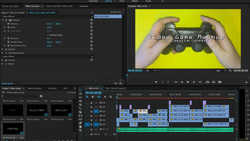
The video is now currently uploading to YouTube. In the meantime, check out some screenshots of the project files in Logic and Premiere.
 |  |
|---|
24/10/15
The project is complete. It is on YouTube. It is done. AND I have managed to get an entire 70 views in 24 hours (YouTube fame here I come).
You can check out the final video on YouTube here.
Now I'm going to think about what I want to showcase on the tech in music ed night. Currently, I would of course like to have my video played, but I would also like to have a live installation, my current idea is to have videos from video games playing, with a controller in front of the computer where people can pick it up and come up with their own themes to play along with.
12/11/15
Today I created everything I need for my installation. I decided that I wanted people to be able to play the controllers as midi instruments, and then thought it would be great if people could actually play a game while they were at it.
So I needed to figure out in logic how I could have different midi devices sending to different tracks at the same time. This was my process:
- Recalibrate my mapping in ControllerMate so that each midi controller was sent to a different channel.
- Do the same for the wii remote in OSCulator.
- In Logic, open the midi environment window and match each track to have a different channel input.
- Arm all the tracks to record.
So now, I've got the midi devices all ready to go. I am using OpenEmu, a multi-console emulator that allows me to use my USB nintendo NES controller to play Super Mario Bros.
Stay tuned for videos and photos from the event.
14/11/15
The showcase night was a success! People seemed to really enjoy the idea of being able to create music using these alternate midi devices (and also playing Super Mario).
Check out some photos from the event.
 |  |
|---|---|
 |  |
 |  |
 |